 微信登录
微信登录
 QQ登录
QQ登录


小型压接类机械连接零件结构设计方案
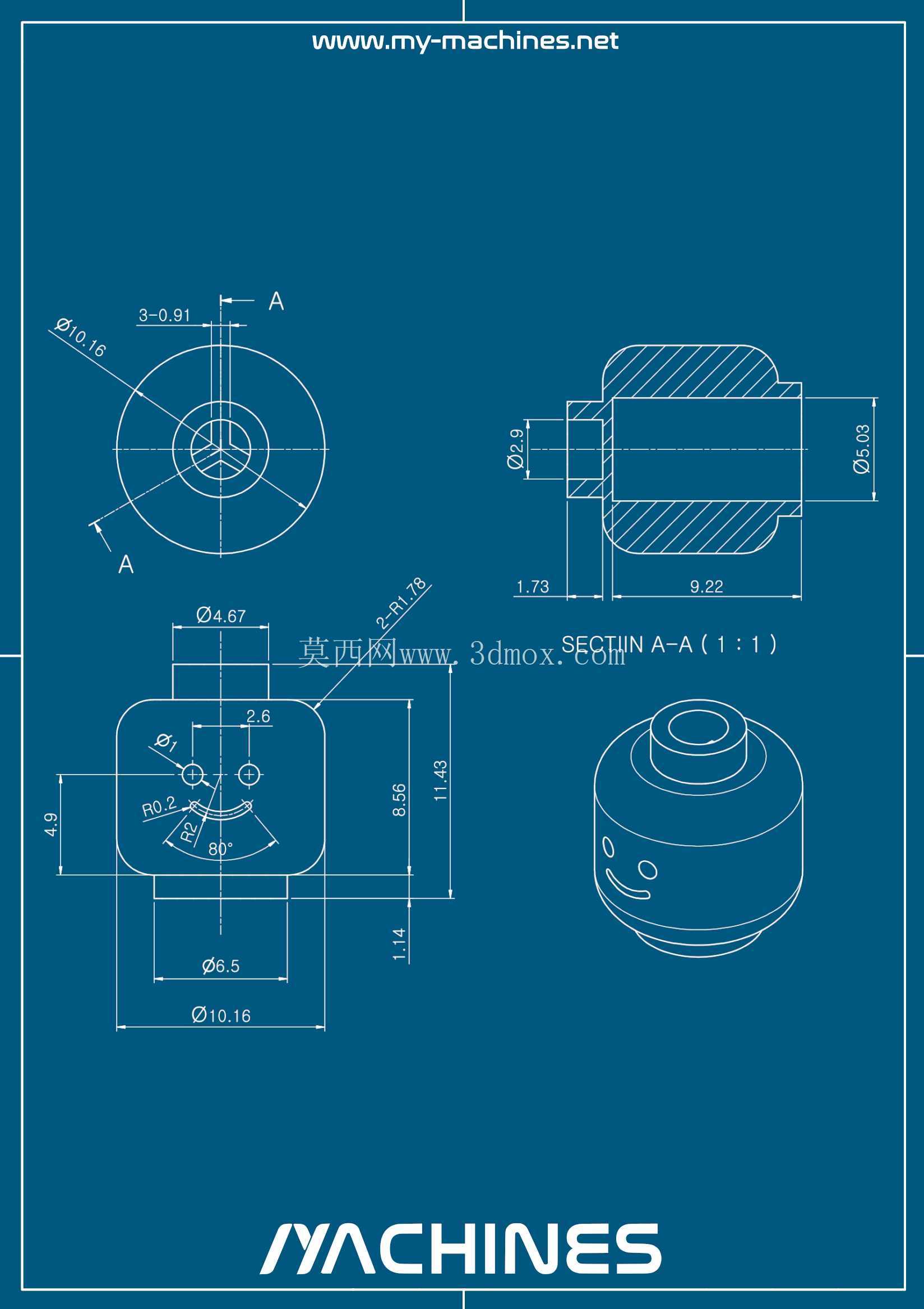
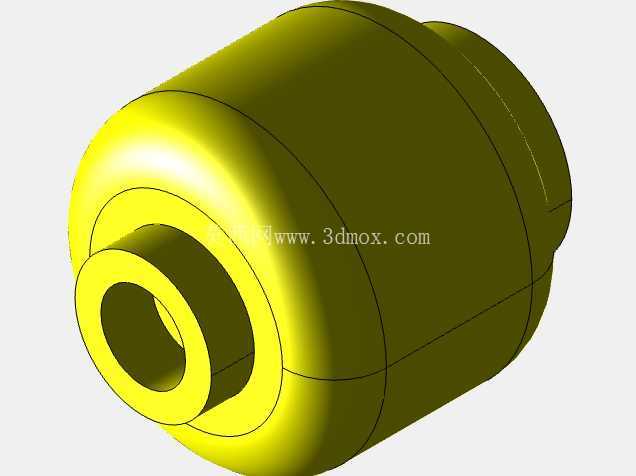
这类小型压接结构件常见于低压流体管路、小型气动回路的终端连接场景,也会用在小型电子设备的结构固定点位,承担介质导通、部件定位、载荷传递的多重作用,在小型自动化设备的气路排布、消费电子的内部结构连接、民用五金的管路接驳场景中都有大量应用。从结构设计逻辑来看,该零件采用同轴回转体搭配方形安装基座的组合构型,方形基座的作用是提供安装时的防转限位,避免零件在装配锁紧过程中跟转,也能在长期受振动载荷的工况下降低连接松脱的概率;上部的回转体结构则用于配合外接管路或者对接接头,外圆面的公差配合需要根据对接件的材质做适配,若对接的是软质塑胶管路,外圆尺寸需要预留0.1-0.2mm的过盈量,保证压接后管路内壁与零件外圆紧密贴合无泄漏;若对接的是金属硬管,则需要按照基孔制/基轴制的过渡配合设计,同时预留密封件的安装槽位。
从图纸标注的尺寸边界来看,零件总高度控制在9.22mm的范围内,上部回转体的外圆直径为6.18mm,方形安装基座的对边尺寸为8.56mm,基座底部的定位凸台直径为10.16mm,凸台高度为1.45mm,这些尺寸边界直接决定了零件的安装空间要求:安装基座的沉孔需要加工成10.2mm直径、1.5mm深度的台阶孔,才能保证零件安装后基座底面与安装面完全贴合,不会出现翘边导致的密封失效问题。基座上开设的两个直径2.6mm的安装孔,中心距为6.47mm,这两个孔用于穿装固定螺丝,安装时需要注意孔位与安装面的螺纹孔对中度偏差不能超过0.1mm,否则会出现螺丝锁附时别劲,长期使用后螺丝断裂的问题。
零件中心的导通孔径为3.09mm,这个尺寸是根据流通介质的流量要求计算得出的,若用于气路导通,该孔径可以满足0.6MPa压力下每分钟120L的压缩空气流通需求;若用于低压液体导通,常温清水工况下的通流能力可以达到每分钟8L,完全覆盖小型设备的流体输送需求。在细节结构设计上,零件所有的锐边都做了0.2mm的倒角处理,一方面是避免装配时割伤操作人员或者损坏对接的密封件、管路,另一方面也能去除机加工过程中产生的毛刺,避免毛刺脱落进入管路造成下游阀件、喷嘴的堵塞。上部回转体的根部做了R0.5的圆角过渡,这个位置是零件的应力集中点,在压接装配或者受侧向载荷时,圆角过渡可以大幅降低应力集中系数,避免零件在根部出现断裂失效。
从加工工艺适配性来看,该零件既可以采用数控车床车削回转体部分,再搭配加工中心铣削方形基座和安装孔的工艺做小批量生产,也可以采用压铸工艺做批量生产,压铸时需要注意分型面设置在方形基座的底面,避免分型线出现在密封配合面上,影响密封性能;同时压铸后的飞边需要做抛丸处理,保证所有配合面的粗糙度达到Ra1.6以下,满足装配要求。在实际选型使用时,需要根据工况的介质类型选择对应的零件材质,普通气动场景可以选用6061铝合金做阳极氧化处理,重量轻且成本低;有弱腐蚀介质的场景可以选用304不锈钢材质,耐腐蚀性更强;若用于食品接触的场景,则需要选用316L不锈钢并且做镜面抛光处理,满足食品卫生级要求。装配过程中,压接管路时需要使用专用的压接钳,保证压接力均匀作用在管路周向,避免出现单边压接过深导致的管路开裂,或者压接过浅导致的管路拔脱问题;锁附固定螺丝时需要采用对角锁紧的方式,锁紧扭矩控制在0.8-1.2N·m之间,避免扭矩过大导致方形基座变形,或者扭矩过小导致固定不牢。
- 上一篇:FreeCAD入门倾斜平面支座零件建模练习
- 下一篇:双孔连接传动连杆结构练习模型

- 全部评论(0)

- 模板大小: 431.61 KB
- 售价:5金币
- 下载次数: 35
- 系统要求: STEP / IGES,FreeCAD,Rendering
- 软件分类: 通用机械零部件